Part 1 - Stateful Authentication
Introduction
Imagine every time you browse your social media - every like, comment, or page navigation - the login page appears and you need to log in again.
What we described above is the nature of the HTTP protocol. HTTP is stateless by nature, meaning every request you send to the server is independent. The server does not automatically remember previous requests from the same client.
Authentication is not the end of the process. Many people think that after sending the username and password, the server validates the credentials and authentication succeeds. However, it is only the beginning of a new challenge: How does the application recognize this user in the next request?
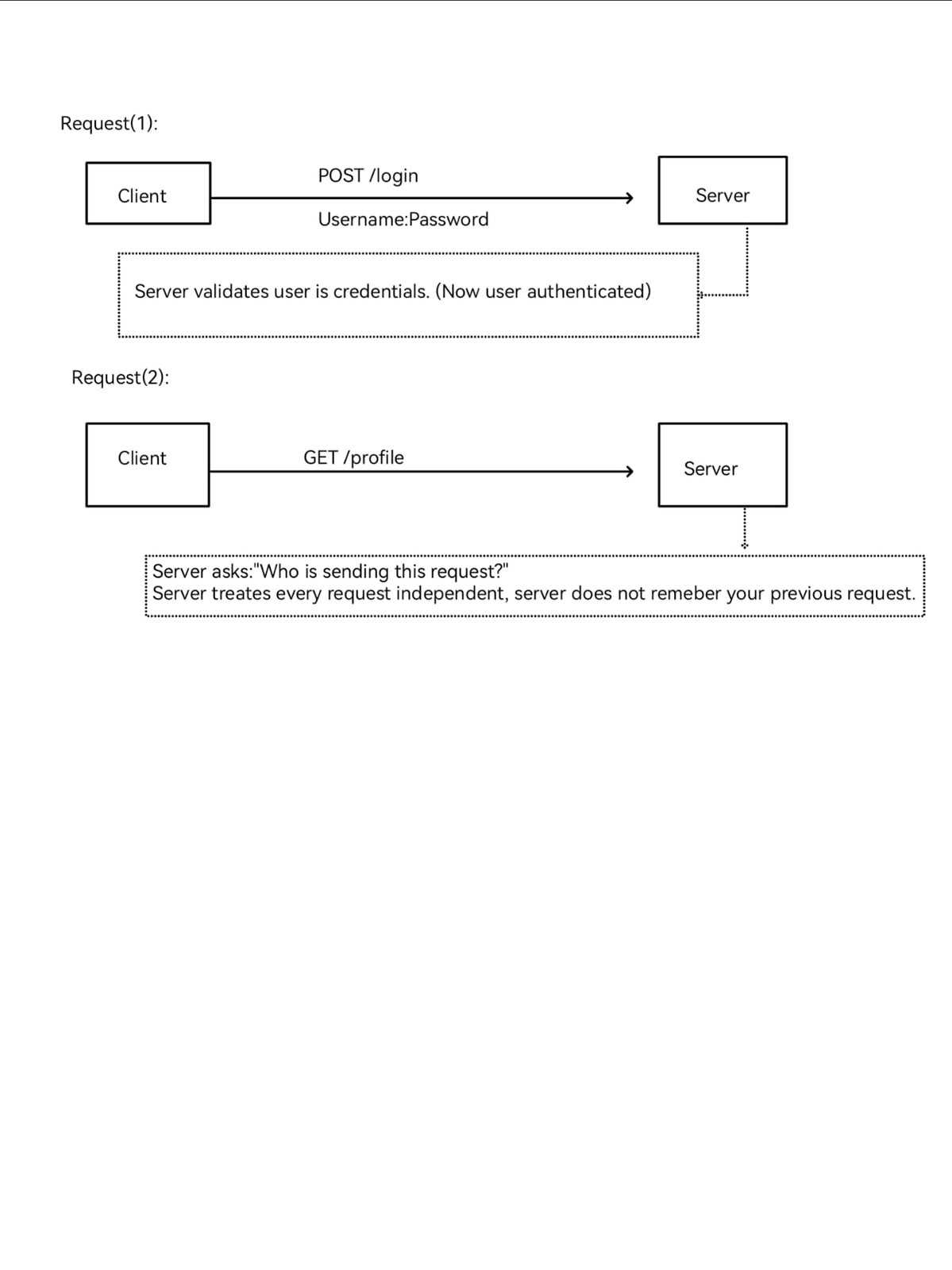
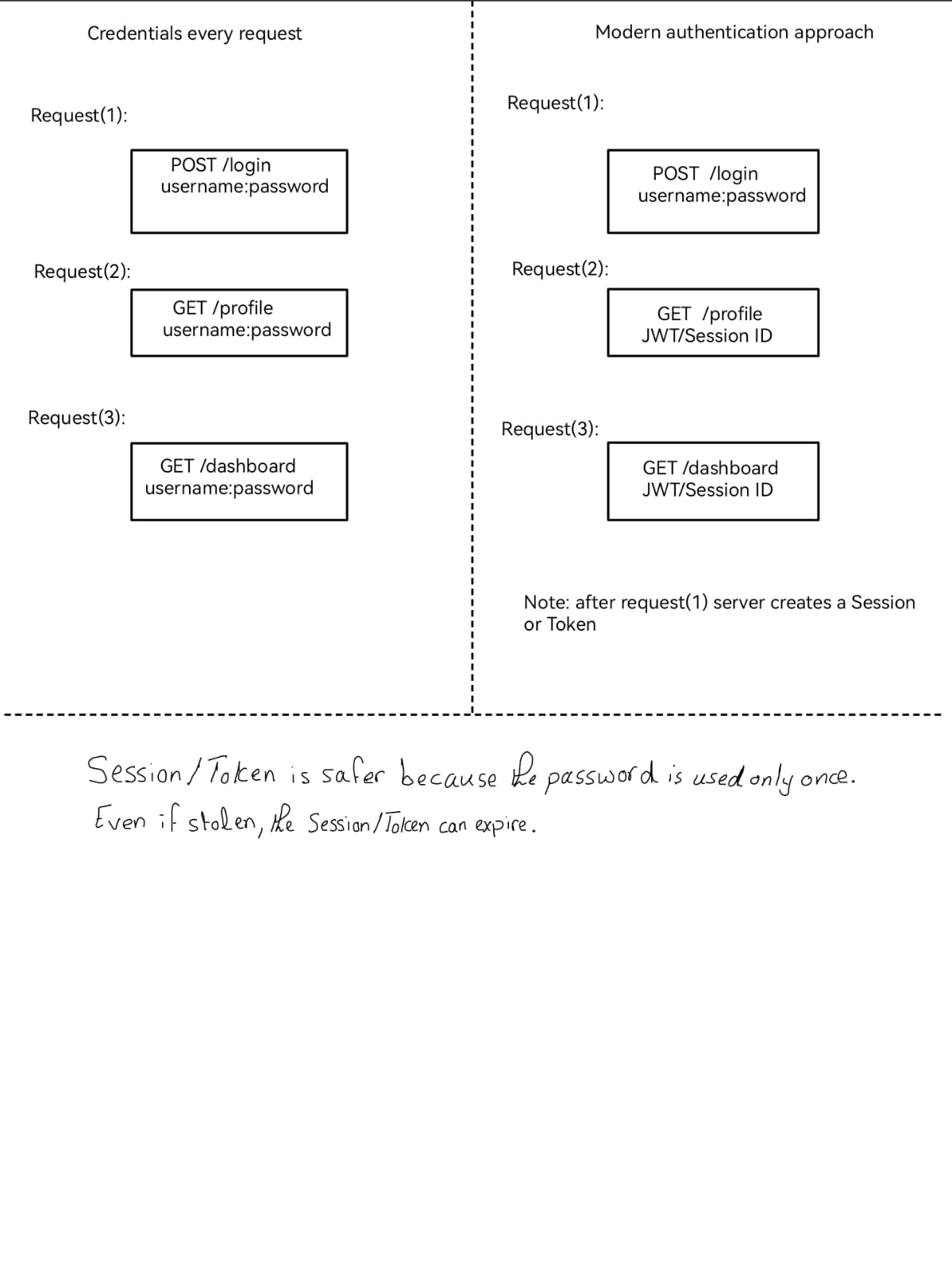
At this point, a simple solution might come to mind: what if we send the credentials with every request? The solution looks logically correct - it solves the stateless nature of HTTP - but this solution introduces security and usability problems.
Security problems
- Credentials are transmitted repeatedly.
- Every transmission increases the opportunity for credential exposure.
- The password becomes the proof of identity instead of being used only for initial authentication.
- It becomes difficult to implement modern authentication mechanisms efficiently.
User experience problems
- Users should not have to authenticate before every action.
- Applications are expected to provide a seamless, persistent login experience.
Web applications need another approach to enhance security and usability. This leads to two major approaches: Stateful Authentication, which stores authentication state on the server, and Stateless Authentication, which allows the client to present a verifiable token with each request.
Modern Authentication Model
The solution to this problem comes in a simple concept: what if, after authentication, we exchange the credentials with a piece of information that proves the user's identity in every future request?
Modern web applications usually use one of the following two mechanisms to maintain authentication state:
Session Identifier
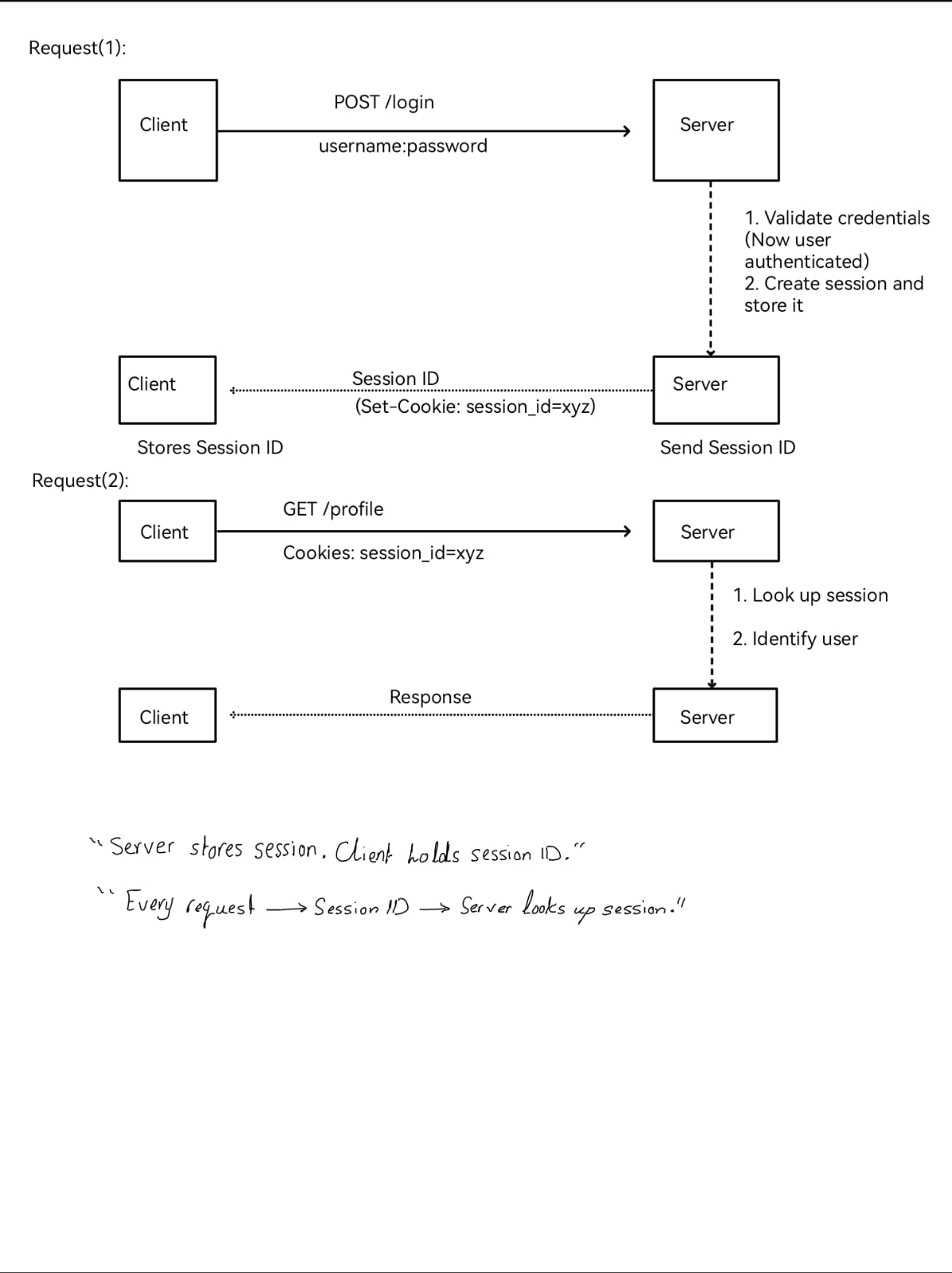
The server creates a session after the user successfully authenticates. This session contains information about the authenticated user, such as identity, authentication status, and other session-related data. The session is stored on the server, while the client receives only a unique Session ID, usually through a cookie. For each subsequent request, the client sends the Session ID, allowing the server to locate the corresponding session.
Authentication Token
Instead of creating a session on the server, the server issues an authentication token that represents the authenticated user. One common example is a JSON Web Token (JWT). The client sends this token with every request, allowing the server to verify the user's identity without requiring the username and password to be transmitted again.
Both mechanisms solve the same problem: they allow the client to prove its identity in future requests without repeatedly sending credentials. However, using them does not mean the system is immune to attacks. Each mechanism comes with its own security challenges.
Two Architectures Behind the Modern Authentication Model
While both mechanisms share the same responsibility, each implements it with a different architecture.
Stateful Authentication
In stateful architecture, after the server successfully validates the credentials and authenticates the user, the server creates and maintains a session for the authenticated user. The user only receives the Session ID, which it can use to validate its identity in future requests.
Stateless Authentication
In stateless architecture, the server does not create a traditional server-side session for the authenticated user. Instead, it sends a token that contains information the server can verify in future requests.
These two approaches solve the same authentication-state problem in fundamentally different ways. In this article, we will focus on Stateful Authentication. Stateless Authentication will be explored separately in Part 2.
Stateful Authentication Architecture
Introduction
In stateful authentication, the server takes responsibility for remembering who you are after you successfully authenticate.
Let's take a look at the flow:
Think about it like this: you go to a coffee shop. When you enter, the waiter says: "Welcome back, Loay. Last time you ordered espresso. Would you like the same thing?"
This means the waiter has state - they remember your name and your last order.
What Is a Session?
Before we zoom into the session itself, we need to understand something important: the Session ID is not the session itself. The Session ID works as a reference or identifier that points to the session.
Session
----------------
Session ID: 8f3...
User: Loay
Authenticated: Yes
Privileges: User
Created: 2:30 PM
Expires: 3:00 PM
This is a session. It contains the information the server wants to remember about the user during that session. Sessions can be used for authenticated users and non-authenticated, guest users as well.
How Does the Next Request Work?
Now let's answer our original question: How does the application recognize this user in the next request?
Step 1 - The User Receives the Session ID
After the server creates the session, it sends the Session ID through the Set-Cookie response header.
Server --Set-Cookie: session_id=xyz--> Client (Browser)Step 2 - The Session ID Is Stored
After receiving the cookie, the browser stores it based on the cookie's properties and attributes. These properties matter later when we look at the attack surface, because controls such as Secure, HttpOnly, and SameSite change how the browser handles the Session ID.
Cookies are small pieces of data that browsers keep. The cookie containing the Session ID is stored on the client side according to its configured attributes and is automatically included in matching requests by the browser.
Step 3 - The Client Sends Cookies with Every Request
For every future request that matches the cookie scope, the client automatically sends the cookie in the request header.
Step 4 - The Server Identifies the User
When the server receives the request, it usually follows this flow:
- Extracts the Session ID from the cookie.
- Looks up the session in its storage.
- Retrieves the user's session information.
- Processes the request based on that information.
This happens automatically for every matching request. The user does not need to manually attach the Session ID - the browser handles that behavior.
Where Is the Session Stored?
A stateful application needs a place to maintain its sessions. The choice of session storage affects performance, scalability, and how easily the application works across multiple servers.
There is no single correct answer about where the session should be stored. Every application is different. The architecture and needs of the application determine the best choice.
Memory
The session is stored directly in the application's memory. It is fast, but the session is tied to that server and may be lost if the application restarts.
Database
The session is stored in a database, allowing multiple application servers to access the same session information.
Redis or Memcached
Sessions can also be stored in a shared in-memory data store, providing fast access while allowing multiple servers to use the same sessions.
Session ID
   |
   v
Application
   |
   +----------+-----------+
   v          v           v
 Memory    Database    Redis/Cache
This is one reason why Redis or a database is often preferred for production applications. We will explore the scaling challenge in more detail later.
How the Server Verifies a Session
The verification of the session was mentioned before, but now we will dive into it more.
In the last part, we studied that session storage differs according to the architecture. Now let's take a database as an example for the storage.
Step 1 - Receive the Request
The server receives the HTTP request and extracts the Session ID from the cookie.
Step 2 - Find the Session
The server uses the Session ID to search the session store. For our example, assume the sessions are stored in a database:
Session ID = 1234

SELECT *
FROM sessions
WHERE session_id = '1234';
Now there are two possible paths: either the session exists, or the session does not exist.
Step 3 - Session Exists
If the session is found, the server retrieves its information. But finding the session is not necessarily the end of the verification.
The server can then check whether the session is still valid:
Session found
   |
   v
Is it expired?
   |
   v
Is it revoked?
   |
   v
Is it otherwise valid?
Step 4 - Session Is Invalid
If the session is expired, revoked, or otherwise invalid, authentication fails and the request should be rejected.
Session found
   |
Expired / revoked / invalid
   |
Authentication fails
   |
401 Unauthorized
Step 5 - Session Is Valid
If the session is valid, the server now knows that the request carries a valid Session ID associated with an authenticated session.
This is the end of authentication for that request, not the end of the whole security decision. After that, the server still needs to check authorization: is this authenticated user allowed to perform this action?
What Happens When the Session Expires?
Sessions do not last forever. They have a lifecycle - they are created, used, and eventually they end.
Why Do Sessions Expire?
Sessions expire for security reasons. If a session never expired, someone who stole your Session ID could access your account forever. Expiration limits the damage if a session is compromised.
The Session Lifecycle
User Logs In
   |
Session Created
   |
User Makes Requests (Session Active)
   |
Session Expires / User Logs Out
   |
Session Destroyed or Invalidated
   |
User Must Log In Again
How Does a Session Expire?
There are a few common ways:
- Fixed expiration: the session expires after a set time, like 30 minutes from creation.
- Sliding expiration: the session expires after a period of inactivity. Every valid request may reset the timer.
- Absolute expiration: the session expires at a specific time, regardless of activity.
What Happens When the Session Expires?
When a session expires, the server no longer accepts it as valid. The session may be removed immediately or later by a cleanup mechanism, depending on the implementation.
- The Session ID can no longer be used to authenticate the user.
- The user's next request is rejected.
- The user must log in again.
User Logout
When a user explicitly logs out, the server should invalidate the session. This is different from expiration - it is intentional and should take effect immediately on the server side.
Session Revocation
An administrator or security process can also revoke a session for security reasons, such as suspicious activity or a password change. This is similar to logout, but forced by the system.
Why Stateful Authentication Can Be Useful
After understanding how Stateful Authentication works, let's look at its advantages.
1. Server Has Full Control
The server owns the session. It can destroy, modify, or extend the session at any time. This gives administrators strong control over user sessions.
2. Easy Session Revocation
If a session is compromised, the server can immediately delete or invalidate it. The Session ID becomes useless, and the attacker is logged out.
3. Simple Logout
Logout is simple from the architectural point of view: the server invalidates the session. The user is logged out because the Session ID no longer points to a valid authenticated session.
4. Privilege Changes Can Be Easier to Enforce
Because the server controls the authentication state, it can update or invalidate the user's session when privileges change. Some applications store authorization information directly in the session, while others use the session to identify the user and retrieve current privileges from another server-side source.
5. Sensitive Data Stays Server-Side
The client only has a Session ID. The server holds the session data. This reduces exposure if the client is compromised because the browser does not need to store the full session record.
6. Easy to Implement
Most web frameworks support sessions out of the box. Stateful Authentication is usually one of the easiest approaches to get started with.
Putting the Full Flow Together
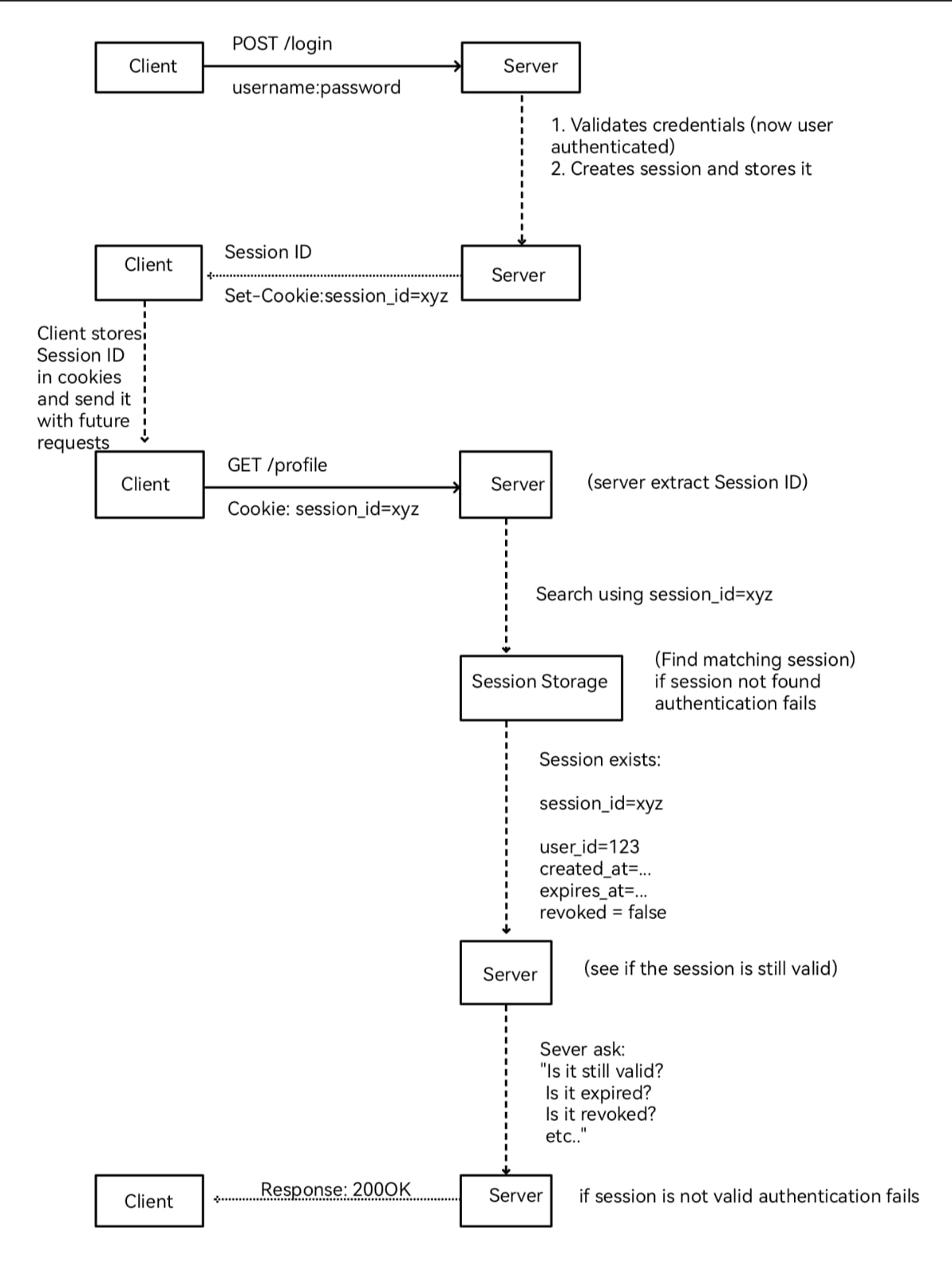
Now that we have gone through the Stateful Authentication flow step by step, we can put all the pieces together. The following diagram shows the complete flow, from the initial login and session creation to the next request, session lookup, and validation.
Keep this full picture in mind. In the security section, we will return to the same architecture and start asking where each part can fail and what an attacker may try to abuse.
Security Perspective
Revisiting the Flow: Thinking Like an Attacker
Before we come to this point, we already understand the session from the moment it is created until it expires. Now let's look at the same flow again, but this time with a different set of eyes.
The user visits the application. The application may already create a guest session. Then the user logs in, the server validates the credentials, and the authentication state changes. After successful authentication, the server should rotate the Session ID and send the new value through Set-Cookie. The browser stores it and sends it with matching requests.
From this flow, we can start thinking: where can this fail? We do not need to start by memorizing attack names. We can start from the architecture itself and follow the Session ID from one point to the next.
The Core Trust Assumption
There is one idea we need to keep in mind before looking at any attack. The server is not looking at the human behind the request. It is looking at the Session ID.
When the server receives a Session ID, finds a real session behind it, and sees that the session is still valid, authentication for that request succeeds. The server knows that the request carries a valid session credential. It does not automatically know who is physically using that credential or whether the real user intended this exact action.
Cookie: session_id=xyz
        |
        v
Session exists -> valid -> authenticated request
This is where the attacker starts thinking. If I can capture this value, steal it, make the browser use it, or make a value I already know become authenticated, what will the server see? In many cases, it will still see a valid Session ID.
Trust Point 1: Network Transmission
Let's start with the network. The Session ID has to travel between the client and the server with future requests. What if an attacker can observe that traffic?
If the application sends the session cookie over plaintext HTTP, the Session ID can be visible on the network. At that point it is almost an open goal for the attacker: capture a value the server already trusts, then replay the same value while the session is still active.
Attacker can observe traffic
          |
          v
   Session ID captured
          |
          v
 Replayed to the server
          |
          v
    Session hijacked
From the server side: the request does not automatically look different. The server receives a valid Session ID, finds the session, checks it, and accepts it. It does not know that the value was copied from the network.
This is why transport protection is part of session security. HTTPS/TLS protects the traffic, the Secure cookie attribute stops the browser from sending the cookie over plaintext HTTP, and HSTS helps keep the site on HTTPS.
Trust Point 2: Client-Side Storage
Now let's move to the client side. The browser has to keep the Session ID somewhere so it can send it again. Think about it: what if attacker-controlled JavaScript can read that value?
If the application has an XSS vulnerability and the session cookie is not protected with HttpOnly, JavaScript can read the cookie through document.cookie. The attacker can take the Session ID out of the victim's browser, send it to their own server, and then replay it.
Attacker-controlled script
          |
          v
   document.cookie
          |
          v
   Session ID stolen
          |
          v
 Replayed to server -> Session hijacked
From the server side: again, the Session ID is valid. The lookup works. The session is active. The server has no built-in way at this point to know that the identifier was stolen from the browser.
HttpOnly closes this specific path by preventing normal JavaScript from reading the cookie. But HttpOnly does not solve XSS itself. Preventing the injection, using context-aware output handling, and adding a strong Content Security Policy are still important because the next problem starts even when the cookie cannot be read.
Trust Point 3: JavaScript Inside the Trusted Origin
Here is the next question: what if HttpOnly is enabled, so the attacker cannot read the Session ID, but attacker-controlled JavaScript is already executing inside the trusted application origin?
At first this may sound safe because document.cookie cannot reveal the session cookie. But the attacker may not need to read it. JavaScript running in the same origin can make requests to the application, and for matching same-origin requests the browser can send the session cookie with them.
fetch("/change-email", {
    method: "POST",
    headers: { "Content-Type": "application/json" },
    body: JSON.stringify({ email: "[email protected]" })
});
The attacker does not need to know the Session ID value in this case. The victim's browser already has it. The attacker is using the browser as the authenticated client.
HttpOnly = JavaScript cannot read the cookie
HttpOnly != JavaScript cannot make the browser use the cookie
From the server side: it receives a normal authenticated request with the victim's valid session. The session layer alone cannot tell whether the request came from the user clicking a button or from injected JavaScript running in the same origin.
So the main control here is not another cookie flag. The real goal is to stop the XSS: keep attacker-controlled script out of the trusted origin, use a restrictive CSP as another layer, and require re-authentication or step-up verification for actions where one compromised browser request would have a high impact.
Trust Point 4: Request Origin and User Intent
Now let's leave XSS completely. What if the attacker never steals the Session ID and never executes JavaScript inside the target application?
This is where CSRF becomes interesting. The attacker can try to make the victim's own browser send a state-changing request to the application. If the cookie rules allow it, the browser may attach the victim's session cookie automatically.
Attacker website
      |
      | causes request to target
      v
Victim browser
      |
      | browser may attach matching session cookie
      v
Target application
      |
      v
Action processed as the victim
Look at what happened here: the attacker never owned the Session ID. The victim still owns it. The attacker only made the victim's browser use it.
Session theft -> attacker gets the Session ID and replays it
CSRF          -> victim keeps the Session ID, but the browser uses it for the attacker
From the server side: the Session ID is valid and the session is active, so authentication succeeds. What is missing is proof that the user intended this particular state-changing request.
That is why CSRF protection has to add another signal beyond the session cookie itself. CSRF tokens can prove that the request came through the application's expected flow, SameSite can restrict when cookies are attached to cross-site requests, and Origin or Referer checks can provide another server-side signal.
Trust Point 5: Authentication Transition
Now go back to the beginning of the flow. Before login, the application may already have a guest session. After login, that same browser becomes authenticated. This is a major trust change.
Normally, after successful authentication the server should rotate or regenerate the Session ID. But what if it does not? Here the attacker starts thinking: can I make the victim log in using a Session ID that I already know?
If the application keeps the same identifier before and after authentication, the attacker's known Session ID may become the identifier of the victim's authenticated session. The attacker does not need to steal anything after login because they already know the value.
Attacker knows Session ID
          |
          v
Victim is made to use it
          |
          v
      Victim logs in
          |
          v
Server keeps same Session ID
          |
          v
Attacker reuses it as authenticated session
This is Session Fixation. The failure is not that the server created a session. The failure is that the authentication state changed while the identifier did not.
From the server side: the session exists and later becomes authenticated. If the identifier is never replaced, the lookup logic has no reason to know that the same value was already known by the attacker before login.
The main control is simple: rotate the Session ID after successful authentication and invalidate the old pre-authentication identifier. The same idea can also matter when a session crosses other important privilege or trust boundaries.
Trust Point 6: A Valid Session ID Reaches the Server
Now we can connect all the previous points. The attacker may capture a Session ID from the network, steal it from the browser, keep control of it through fixation, or in a weak implementation even guess or predict one. Different failures, but they can end at the same place: the attacker now has a valid Session ID.
At this point the attacker sends that value to the server and starts acting as the authenticated user.
Attacker gets valid Session ID
          |
          v
 Replays it to the server
          |
          v
Server lookup -> session valid
          |
          v
 Attacker acts as the user
This is Session Hijacking.
The important point is that Session Hijacking is usually the outcome, not the first failure. The real failure may have happened earlier in the network, in client-side storage, during Session ID generation, or during the authentication transition.
From the server side: everything can look correct. The Session ID exists, it maps to a real session, and it is not expired or revoked. Possession of that identifier does not prove that the requester is the same human who originally authenticated.
There is no single control for Session Hijacking because there is no single path to it. We protect the Session ID while it travels and while it is stored, generate unpredictable identifiers, rotate them when trust changes, expire and revoke sessions correctly, and invalidate compromised sessions as quickly as possible.
The Common Thread
What do all these attacks have in common?
The application trusted something, and the attacker found a way to make that trust work in a different way than the application expected.
Network transmission   -> Sidejacking
Client-side storage   -> XSS cookie theft
JavaScript in origin  -> Authenticated request abuse
Request intent        -> CSRF
Authentication change -> Session Fixation
Valid Session ID      -> Session Hijacking
The solution is not to memorize every attack. The solution is to understand the system, follow the flow, identify what is trusted, and keep asking the same question:
"Can this trust be broken?"
The Problem: Scaling Stateful Authentication
Until now, we have been talking about authentication as if there is only one server. One server handles all the requests, stores all the sessions, and remembers who you are.
But that is not true in the real world. Companies use multiple servers.
As a website grows, it needs to handle more users and more requests. One server cannot handle all of them - it will be exhausted.
Companies start thinking about how to solve this problem. The solution? Use multiple servers. Instead of one server handling all requests, each server handles a portion of the requests.
But that is not the end. Every new feature comes with its own challenges.
When you have multiple servers, you need to start thinking: which server handles which request?
Here comes the Load Balancer as the solution.
Think of the load balancer like a police officer managing traffic at a busy intersection. Cars come from all directions, and the police officer directs each one to the right road. Some cars go left, some go right, some go straight - depending on where they need to go.
The load balancer does the same thing. Requests come in, and the load balancer directs each one to an available server. This way, no single server gets overwhelmed with traffic.
The Problem: Where Is the Session?
Now here is where the problem starts.
You log in through Server A. Server A creates the session and stores it in its memory.
You make another request. This time, the load balancer directs the request to Server B.
Server B searches for the session but does not find it. The session is with Server A.
Server B asks: "Who is this user?"
The user is already authenticated, but Server B does not have the session.
This is called the scaling problem with Stateful Authentication.
How Do We Solve This?
To solve this, we need a way for all servers to access the same sessions.
We need shared storage.
Instead of each server storing sessions in its own memory, we store sessions in a central location that all servers can access.
Option 1: Database
All servers can access the same database. When a user logs in, the session is stored in the database. Any server can look up the session from the database.
Option 2: Redis
Redis is commonly used as a shared in-memory session store because it provides fast access and can be reached by multiple application servers. Depending on its configuration, persistence and replication can also be used to improve durability and availability.
Multiple Devices
A single user can have multiple active sessions at the same time.
Loay
 |-- Phone   -> Session ID A
 |-- Laptop  -> Session ID B
 |-- Tablet  -> Session ID C
Each device can have its own Session ID while the server maintains the corresponding session records in shared storage.
This also gives the application centralized control. For example, it may revoke only the laptop session or terminate all active sessions belonging to the user.
The Trade-off
Shared storage works, but it adds complexity:
- You need to set up Redis, a database, or another shared session store.
- The storage must be fast and reliable.
- If the shared session store becomes unavailable, application servers may temporarily be unable to validate existing sessions. This makes the session store an important part of the authentication infrastructure that must be designed for reliability.
What's Next?
Shared session storage solves the multi-server problem, but it also introduces another infrastructure component that the application must maintain and depend on.
This leads to another architectural question:
What if the application did not need to maintain authentication sessions on the server at all?
What if the client could carry a piece of information that the server could independently verify on every request?
This is the idea behind Stateless Authentication.
In Part 2, we will build this architecture from the ground up, understand authentication tokens and JWTs, examine how servers verify them without maintaining a traditional session, and then look at the new security assumptions and failure points introduced by that design.
Stateless Authentication - coming soon.
Further Reading
For readers who want to go deeper, these are useful references:
- OWASP Session Management Cheat Sheet: https://cheatsheetseries.owasp.org/cheatsheets/Session_Management_Cheat_Sheet.html
- OWASP Cross-Site Request Forgery Prevention Cheat Sheet: https://cheatsheetseries.owasp.org/cheatsheets/Cross-Site_Request_Forgery_Prevention_Cheat_Sheet.html
- OWASP Cross-Site Scripting Prevention Cheat Sheet: https://cheatsheetseries.owasp.org/cheatsheets/Cross_Site_Scripting_Prevention_Cheat_Sheet.html
- MDN - Using HTTP cookies: https://developer.mozilla.org/en-US/docs/Web/HTTP/Guides/Cookies
- MDN - Set-Cookie header: https://developer.mozilla.org/en-US/docs/Web/HTTP/Reference/Headers/Set-Cookie
- RFC 6265 - HTTP State Management Mechanism: https://www.rfc-editor.org/rfc/rfc6265
- PortSwigger Web Security Academy - CSRF: https://portswigger.net/web-security/csrf
- PortSwigger Web Security Academy - XSS: https://portswigger.net/web-security/cross-site-scripting